Shape the vase
Choose from six starter presets. Adjust the profile, height, width, twist, ribs, and ripples, or generate a random design to work from.
Cybersecurity / San Antonio, TX
Flowers needed a vase. I had a printer.
Shape a vase, preview it in 3D, and export an STL to try on your printer. A little experiment that began with choir-concert flowers.
Download app (.html)Free · Works offline · 760 KB
Save the app, then open it in your browser. Desktop browser with WebGL required.
Design sessions are not saved. Export an STL before closing; STL files cannot be reopened here for editing.
Download → Open → Get started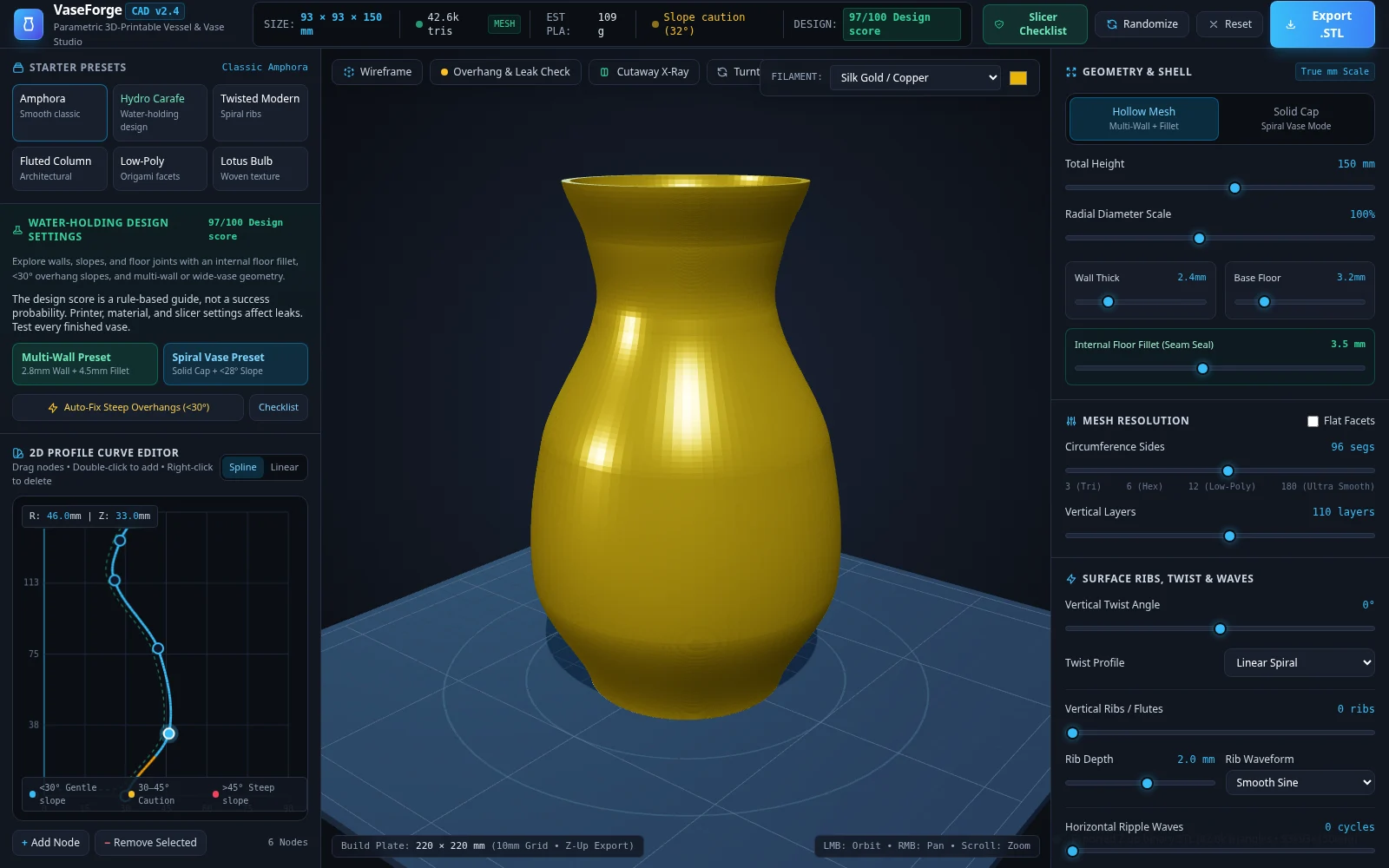
This is an experiment, and the app’s “design score” is a rule-based estimate, not a measured chance of success. A closed model does not guarantee a watertight print. Material, layer bonding, and slicer settings matter too; check your finished vase for leaks before putting it to use.
Design changes are not saved between sessions. Export an STL before closing or reloading; the studio does not import saved STL files for further editing.
My son and I got my daughter flowers for her choir concert. She needed a vase, and I thought, “Let’s see if we can 3D print one.”
The printed vase leaked. What started as a fun experiment gave me something to figure out.
That’s where this app came from. I wanted a way to play with the shape and adjust the walls and base, then export an STL to try again. The goal was simple: make a vase that could actually hold the flowers and the water.
I’m sharing it in that same spirit. If you have a printer and feel like experimenting, maybe it gives you somewhere to start.
Start with a preset or see what a few adjustments produce. The preview updates as you change the design.
Choose from six starter presets. Adjust the profile, height, width, twist, ribs, and ripples, or generate a random design to work from.
Set wall and base thickness, soften the inside floor-to-wall corner, and use the cutaway view to inspect the interior. Overhang shading helps you explore the shape’s slopes.
Export a binary STL in millimeters. Choose a hollow model or a solid model for spiral-vase slicing, and review the included slicer checklist as a starting point.
Download the studio, make a few adjustments, and see where the experiment takes you.
Free · Single HTML file · 760 KB
Use a desktop browser with WebGL support.